![Yeti Support.png]](https://support.yetisoftware.com/hs-fs/hubfs/Yeti%20Support.png?height=40&name=Yeti%20Support.png)
Once a contact has been added to a Site, you can choose which notifications they receive based on the information they need.
Add a Site Contact- Navigate to Sites.
- Edit the Site you would like to update.
- Locate the Site Contact section.
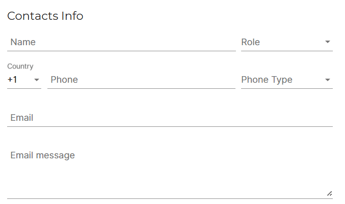
- Enter the contact's information.
- Enter an email address.
An email address is required before notification options can be enabled.
Available Notification Options
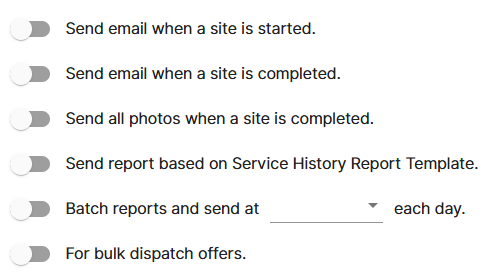
Send Email When a Site Is Started
The contact will receive an email notification whenever service begins at the site.
Send Email When a Site Is Completed
The contact will receive an email notification when service has been completed.
Send All Photos When a Site Is Completed
The contact will receive all photos captured during the service visit once the work has been completed.
Send Service History Reports
Automatically send a Service History Report based on your selected report template. This allows recipients to receive detailed information about completed services.
Batch Reports (Most common)
Batch Reports send a daily summary of activity for a site.
When enabled, the contact will receive a report at the specified time each day. The report includes a summary of the site's activity, including how many times the site was serviced during the reporting period. For example, if the report time is set to 7:00 AM, the contact will receive the report each day at 7:00 AM.
Bulk Dispatch Offers
Enable this option to enroll the site for bulk dispatchs. Learn more about bulk dispatch here.
Best Practices
Different contacts often require different types of updates:
- Property Managers may prefer Service History Reports and completion notifications.
- Tenants may only need service start and completion notifications.
- Operations teams often benefit from daily Batch Reports.
- Stakeholders requiring visual confirmation may want service photos sent automatically.
By configuring Site Contact notifications, you can keep the right people informed without requiring manual updates from your team.